

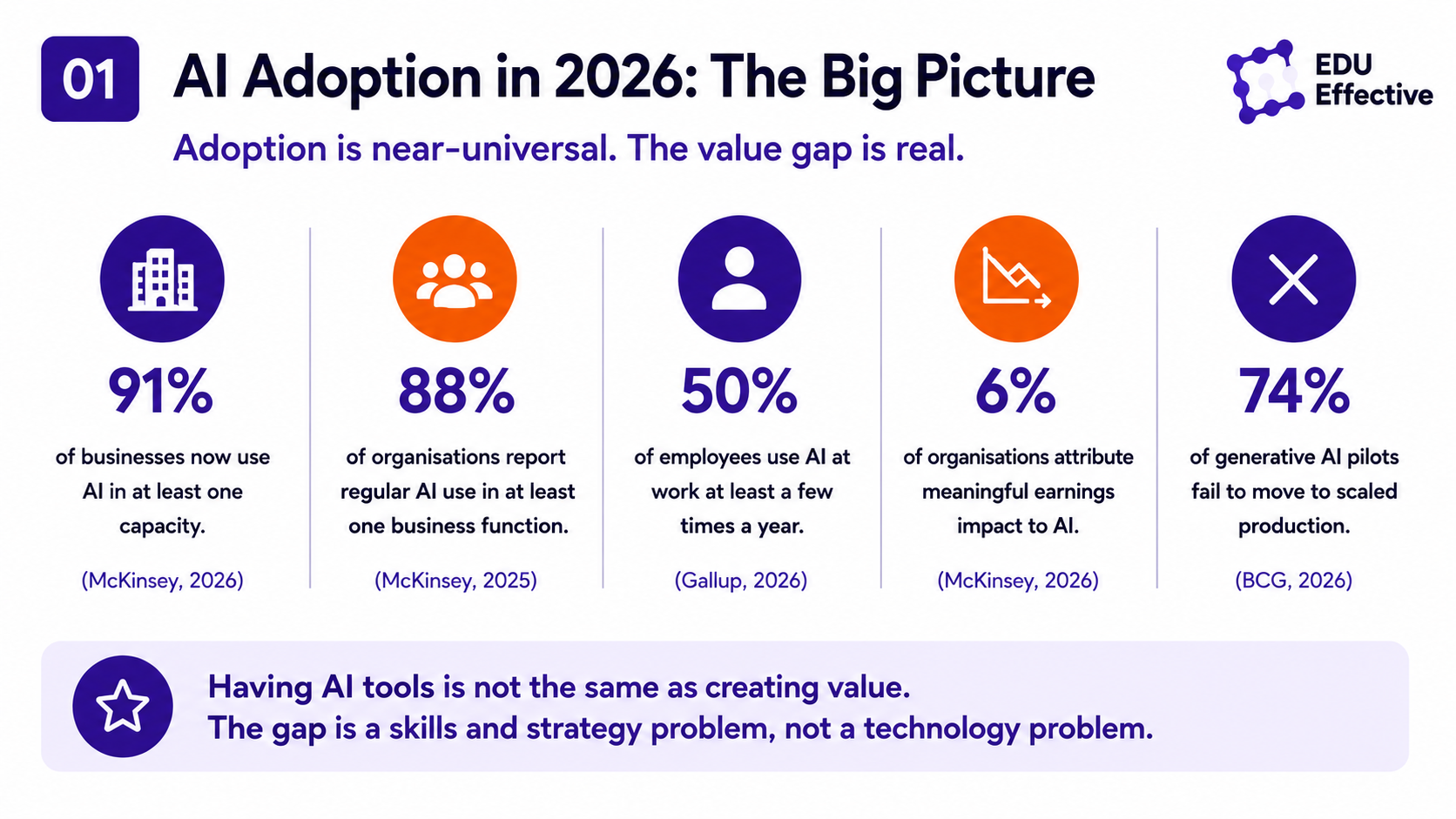
91% of businesses now use AI in at least one capacity. 88% of organisations report regular AI use in at least one business function, according to McKinsey's 2026 State of AI research. McKinsey's 2025 State of AI research found that 88% of organisations now use AI in at least one business function — a 10 percentage point increase in a single year. Gallup's nationally representative survey of nearly 24,000 US employees found 50% now use AI at work at least a few times a year, up from 21% in mid-2023. The speed of adoption across the workforce has no modern precedent.
And yet: only 6% of organisations attribute meaningful earnings impact to AI. A landmark NBER study of 6,000 CEOs, CFOs, and senior executives found 89-95% of firms saw no measurable impact on productivity or employment over the prior three years. 74% of generative AI pilots fail to move to scaled production, according to BCG research. how choosing and using AI tools effectively as an individual professional connects to the broader organisational challenge of AI implementation — and why BCG's finding that 74% of pilots fail to scale is directly related to the tool-skill gap at the individual level that no tool selection alone can solve
These two sets of numbers describe the same reality from different angles. AI tool adoption is near-universal. The gap between having AI tools and extracting genuine value from them is enormous — and it is not primarily a technology problem. It is a skills and strategy problem. The professionals capturing the most value from AI in 2026 are not those with access to the best tools. They are those who understand which tools to use for which tasks, how to direct them precisely, and how to integrate them into workflows in ways that produce measurably better outcomes.
The productivity case: what the evidence actually shows
Before examining which tools work best for which purposes, it is worth being precise about what AI tools can realistically deliver — because both the over-promises and the dismissals in circulation are unhelpful.
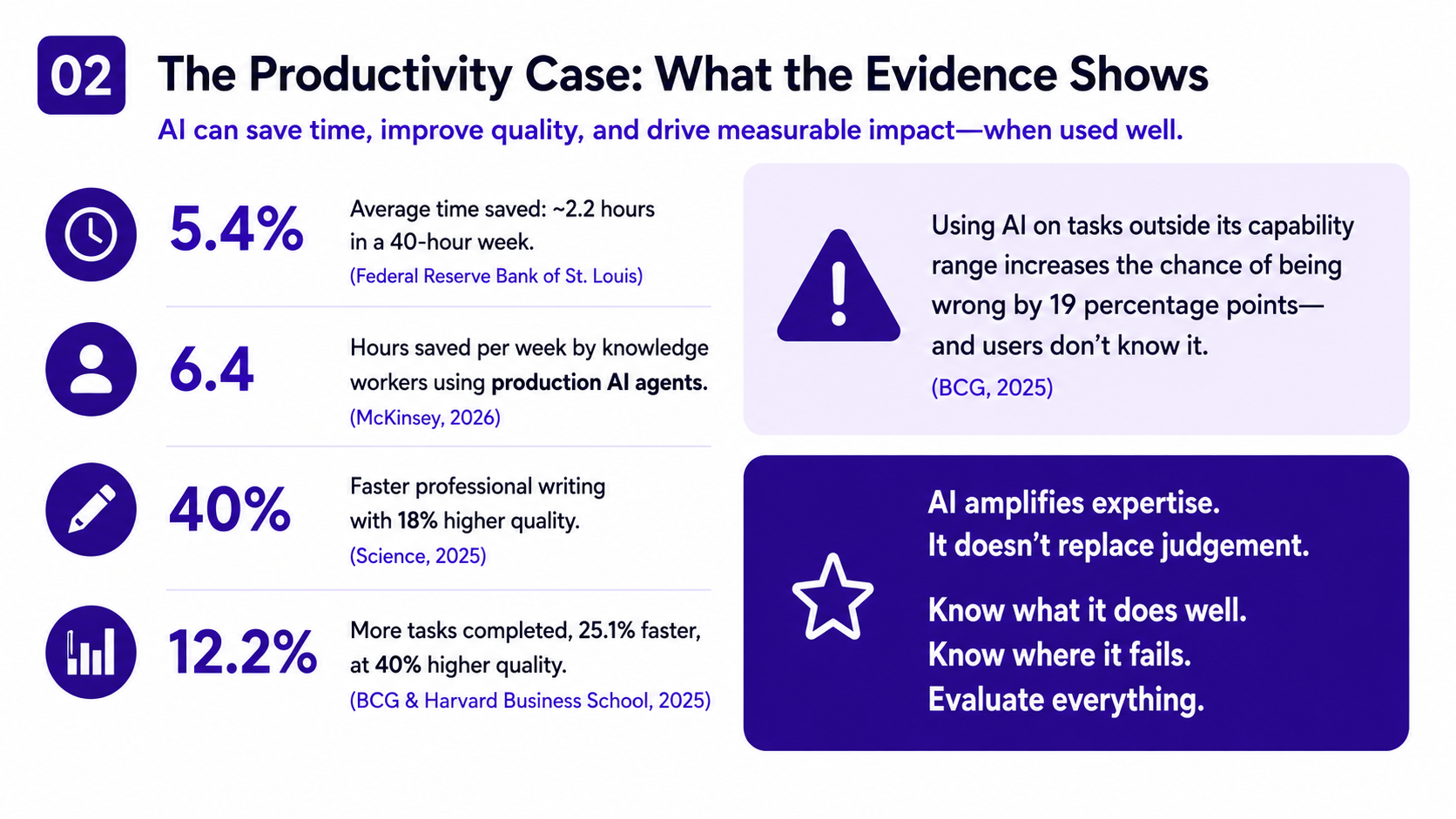
Federal Reserve Bank of St. Louis research, the most rigorous population-level estimate available, found that generative AI users save an average of 5.4% of their work hours — approximately 2.2 hours in a 40-hour week. That is not transformative on its own. It is meaningful: one full additional working day reclaimed per month, per professional. At scale across an organisation, it becomes commercially significant.
But the distribution of gains is wide. Daily AI users save considerably more than the average. McKinsey's research on organisations running production AI agents found knowledge workers saving 6.4 hours per week. A randomised experiment published in Science found ChatGPT cut professional writing time by 40% while raising quality 18% — a simultaneous improvement in speed and quality that is unusual in productivity research, where speed gains typically come at the cost of quality. BCG and Harvard Business School research found consultants using GPT-4 completed 12.2% more tasks, 25.1% faster, at 40% higher quality than peers without AI.
The same BCG study produced a finding that is less frequently cited but equally important: consultants using AI on tasks outside its capability range were 19 percentage points more likely to be wrong — and they did not know it. This is the critical failure mode of AI tool use: confident, fluent output that is factually incorrect, structurally flawed, or strategically misguided, presented with the same apparent authority as output that is excellent. The professionals extracting the most value from AI tools are those who understand both what AI does reliably and where it fails — and who evaluate outputs accordingly.
The main AI tool categories and what each does well
AI tools in professional use fall into distinct categories by function. Understanding what each category does — and where it falls short — is more useful than comparing individual product features, which change faster than any guide can track.
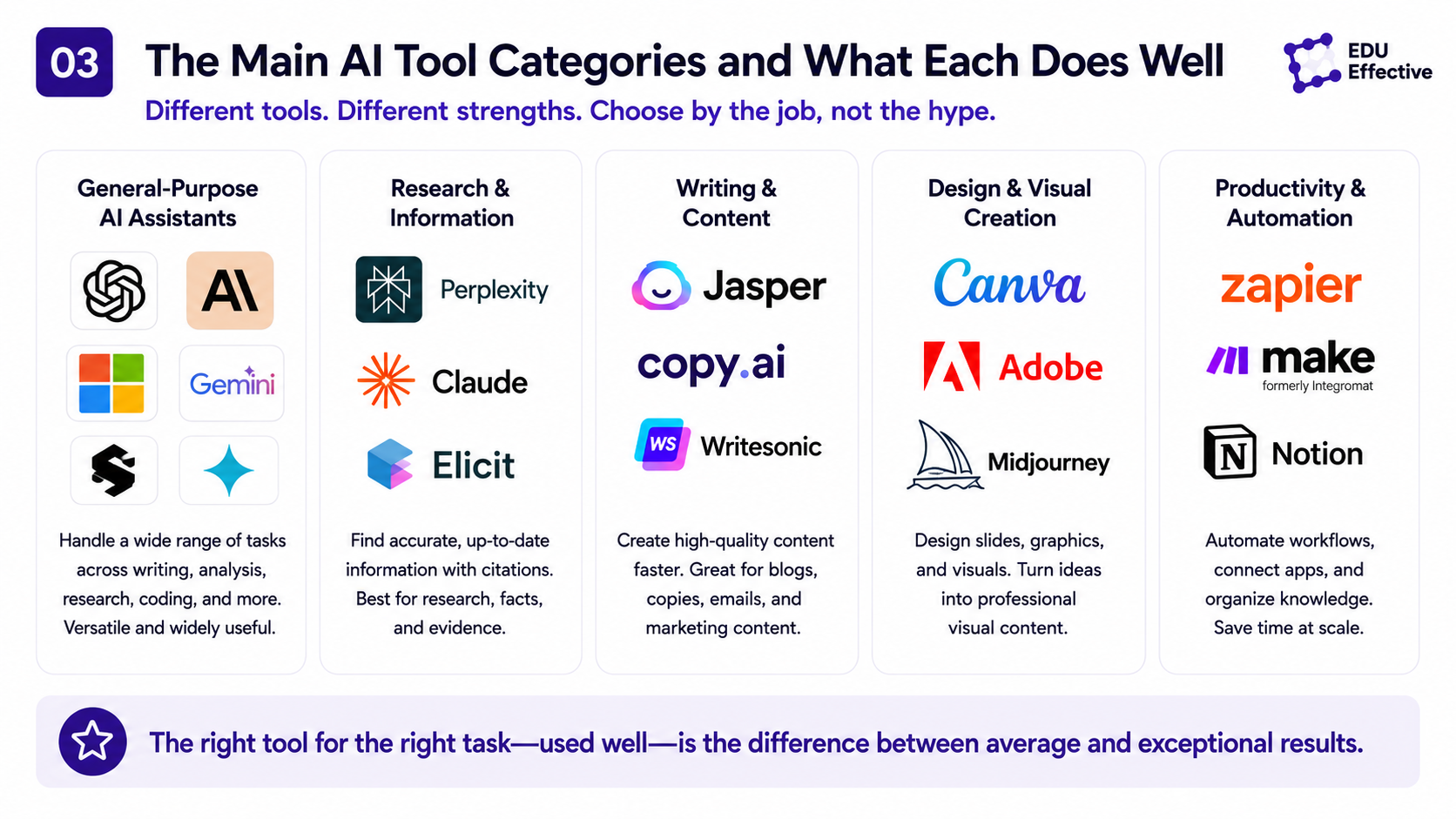
General-purpose AI assistants — ChatGPT, Claude, Gemini, Microsoft Copilot — are the most widely used category. They handle open-ended tasks across domains: writing, analysis, research synthesis, brainstorming, summarisation, translation, coding assistance, and structured reasoning. The differences between them matter less than the quality of the prompts you give them and the critical eye you bring to their outputs.
ChatGPT (OpenAI) remains the most widely adopted general-purpose assistant, with the broadest ecosystem of integrations and the strongest capability for image generation and plugin-based workflows. It is the most versatile choice for professionals who work across multiple tools and need broad compatibility.
Claude (Anthropic) consistently earns strong ratings among professionals for instruction-following, long-document analysis, and writing quality. Its ability to work with very long documents — legal briefs, research reports, full codebases — makes it particularly valued in law, research, and complex knowledge work. Professionals in knowledge-intensive roles who work with large text inputs frequently reach for Claude specifically for this.
Gemini (Google) is the natural choice for professionals embedded in Google Workspace — Docs, Sheets, Gmail, Meet. Its deep integration with these tools means it can act on your actual documents and emails rather than working on copies you paste in. For organisations running on Google infrastructure, Gemini's ecosystem integration is a genuine differentiator.
Microsoft Copilot is the equivalent for Microsoft 365 environments. Embedded in Word, Excel, PowerPoint, Teams, and Outlook, it operates directly on your actual files and conversations. For the majority of enterprise professionals who spend most of their day in Microsoft applications, Copilot's integration advantage is significant.
Perplexity is the most useful general AI tool specifically for research that requires current, sourced information. Unlike the general-purpose assistants, which draw primarily on training data, Perplexity retrieves and synthesises from the live web with citations visible in the response. For any professional task that requires up-to-date information — market research, competitive intelligence, recent regulatory changes — Perplexity is considerably more reliable than asking ChatGPT or Claude a question with a knowledge cutoff.
AI meeting and communication tools — Otter.ai, Fireflies, Notion AI, and meeting summarisation built into Teams and Zoom — handle the transcription, summarisation, and action item extraction that previously required either manual note-taking or a dedicated person. Microsoft research found knowledge workers save 3.6 hours per week on communication tasks with AI assistance — a 31% reduction in communication time. For professionals spending a large proportion of their day in meetings, these tools often deliver the fastest and most measurable return.
AI writing and content tools — Grammarly's AI features, Jasper, and the writing capabilities built into general-purpose assistants — assist with drafting, editing, tone adjustment, and content adaptation. The value depends almost entirely on how the output is used: AI-generated first drafts that are critically edited and enriched with genuine expertise produce excellent results; AI-generated content published without meaningful review produces the "workslop" — fluent but undifferentiated output — that is increasingly recognisable and increasingly devalued. how AI content tools fit into a broader content marketing strategy — and why the workslop failure mode (AI-generated output published without meaningful expert review) is the single most common content marketing mistake in 2026, producing the fluent but undifferentiated content that neither ranks in search nor earns AI citations
AI for data and analysis — Copilot in Excel, Gemini in Sheets, and analytical capabilities in ChatGPT and Claude — make data analysis accessible without specialist technical knowledge. Asking an AI to identify patterns in a dataset, build a formula, generate a visualisation, or summarise what the data shows is now a practical option for any professional with basic data literacy. The caveat is the same as for all AI output: the analysis needs to be checked, not trusted uncritically.
AI for coding — GitHub Copilot, Cursor, Claude for code — are the category with the strongest documented productivity gains for technical professionals. 51% of professional developers use AI tools daily, according to the 2025 Stack Overflow Developer Survey. Time savings for routine coding tasks are consistent and significant.
How to choose: matching tool to task
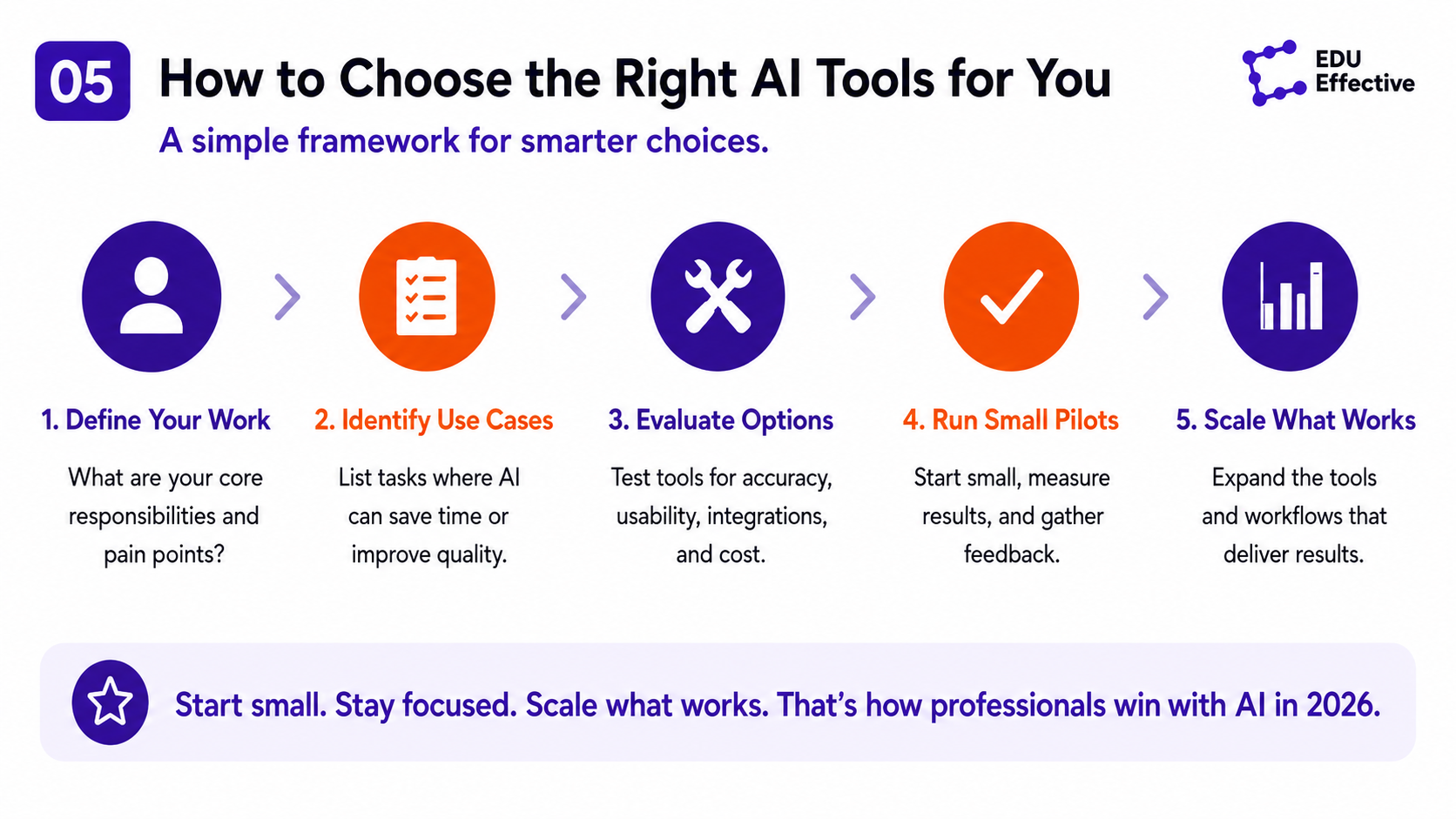
The professionals extracting the most value from AI tools in 2026 have developed one core capability: the ability to match the right tool to the right task. This sounds obvious but requires genuine understanding of each tool's strengths and failure modes.
The practical framework is simple. For tasks requiring current, sourced information: use Perplexity or an AI tool with live web access. For tasks requiring deep analysis of specific documents: Claude's long-context capability is the strongest option. For tasks embedded in Google Workspace: Gemini is the most integrated choice. For tasks embedded in Microsoft 365: Copilot is the most integrated choice. For meeting summarisation and follow-up: dedicated meeting AI tools or native summarisation in Teams and Zoom. For general writing, brainstorming, and analysis where the information is relatively stable: any of the major general-purpose assistants, with output evaluated critically.
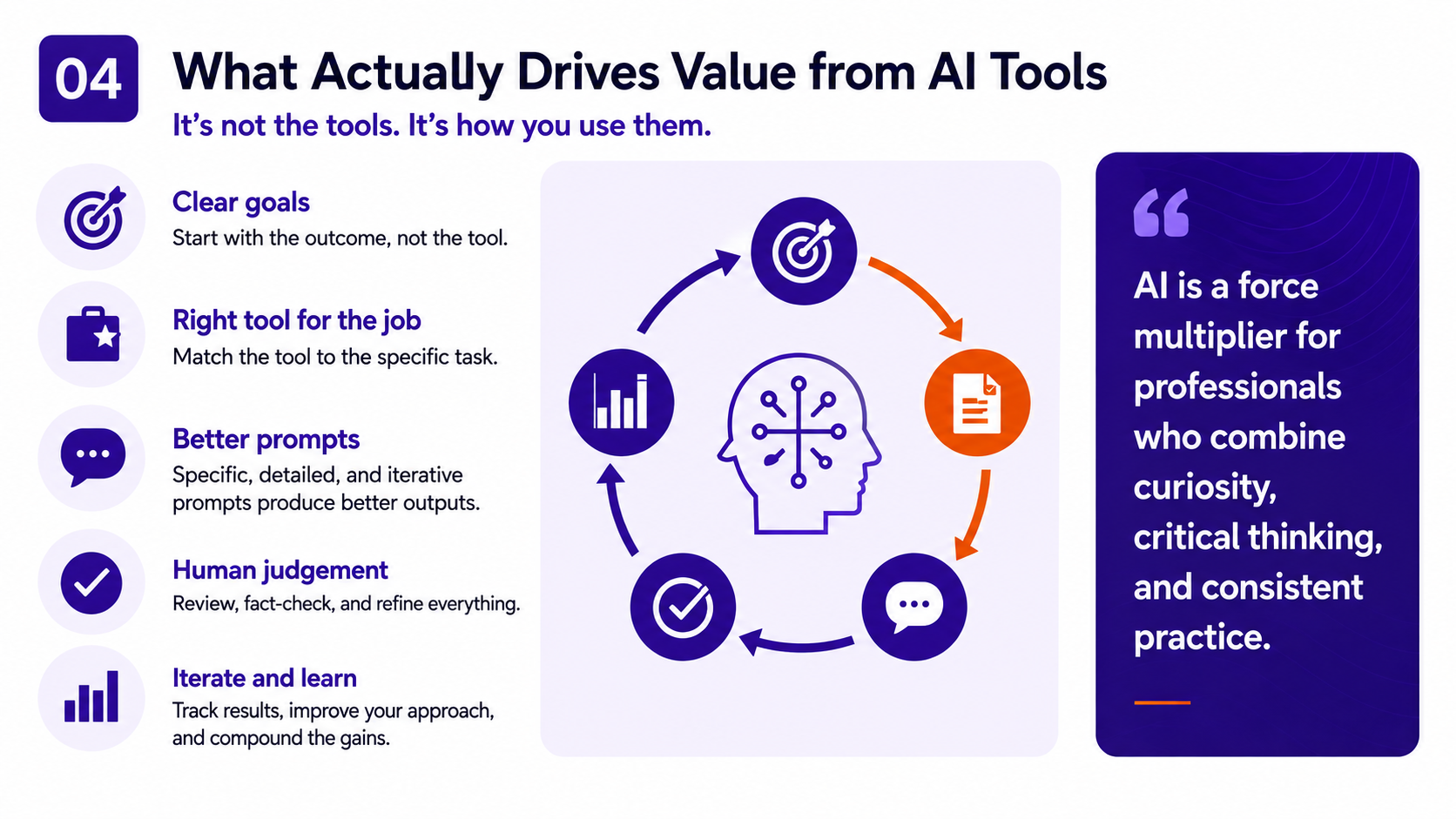
What the framework cannot do is substitute for the judgement about when to use AI at all. Microsoft's 2026 Work Trend Index identifies "Frontier Professionals" — only 16% of AI users — who have deliberately redesigned their workflows around AI rather than bolting AI tools onto existing habits. These users consistently report the highest productivity gains. The distinction is not which tools they use but how deliberately they have integrated them: identifying which tasks benefit from AI assistance, building the habits of directing AI precisely, and developing the critical eye to evaluate AI output reliably. why professionals who have genuinely integrated AI tools into their workflows — Microsoft's Frontier Professionals who redesigned how they work, not just added tools — are among the most commercially valuable in the 2026 labour market, and why the 62% wage premium for AI skills in PwC's research compounds fastest for those with demonstrated practical fluency
The skills that make AI tools work
The gap between average AI tool users and high performers is not primarily about tool selection. It is about three capabilities that determine how much value any tool produces.
Prompt quality. AI tools produce outputs proportional to the quality of the instructions they receive. Vague prompts produce generic outputs. Precise, contextualised prompts with clear objectives, relevant background, specified format, and explicit constraints produce outputs that are immediately useful. Research on prompt engineering consistently shows that the same tool, given a high-quality prompt versus a low-quality one, produces dramatically different results. The skill of writing effective AI prompts is learnable and compounds rapidly with practice.
Critical evaluation. The most dangerous use of AI tools is treating their outputs as accurate without verification. The BCG research finding — that consultants were 19 percentage points more likely to be wrong when using AI on tasks outside its capability range — is a direct function of insufficient critical evaluation. Professionals who understand what AI does reliably and maintain the habit of checking outputs for factual accuracy, logical coherence, and strategic soundness extract far more genuine value than those who outsource their judgement to the tool. why the critical evaluation capability that determines AI tool effectiveness is ultimately a strategic thinking skill — specifically the ability to Challenge and Interpret that the research identifies as most at risk from AI over-reliance, and why Gartner's critical thinking atrophy prediction makes this the most important skill a professional can develop alongside AI fluency
Workflow integration. The professionals who save the most time with AI are those who have changed how they work, not just added AI to existing workflows. This means identifying the specific tasks in your day where AI assistance produces the largest benefit — which varies by role and function — and building habits around directing AI at those tasks systematically rather than using it occasionally when it feels relevant. why building genuine AI tool fluency — the kind that produces measurable productivity gains rather than the average 6% earnings impact — is the highest-return upskilling direction available to most professionals in 2026, and how deliberate workflow redesign differs fundamentally from the passive tool adoption that produces no measurable outcome
The honest picture: what AI tools cannot do
AI tools in 2026 are genuinely capable of handling a significant share of the analytical, communicative, and administrative work that previously absorbed professional time. They are not capable of replacing the judgement, relationship intelligence, contextual understanding, and ethical reasoning that define the highest-value professional work.
The professionals who lose the most time to AI tools are those who use them to produce volume without quality — churning out AI-generated content, analysis, and communication that has the appearance of professional output but lacks the substance that makes it genuinely useful. The productivity gains that matter are those that free up professional time for the work that requires distinctively human capability: strategic judgement, relationship building, creative problem-solving, and decisions that require understanding of context and values that no AI system currently possesses.
The most effective AI tool user in 2026 is not the one who has delegated the most work to AI. It is the one who has delegated the right work — freeing the time and mental bandwidth to do the work that matters more, better.
At EDU Effective, the Effective MBA: Applied Artificial Intelligence builds both the practical AI tool skills and the strategic understanding needed to use AI effectively in professional roles — no coding required. what applied artificial intelligence means in professional practice — the broader framework within which choosing and using AI tools effectively sits as a skill set, and why the 92% of companies increasing AI investment (McKinsey) are not all converting that investment into measurable productivity gains Explore the programme →
EDU Effective Business School — professional development for your long-term success.
All five Effective MBA programs are built on the same educational model — designed for working adults who need learning that fits real professional life:
- Effective MBA: Executive Management & Leadership
- Effective MBA: Applied Artificial Intelligence
- Effective MBA: Coaching, Leadership & Mentoring
- Effective MBA: Mastery in AI
- Effective MBA: Online Marketing
Every programme runs on 15 minutes a day, completes in 10 months or less, is ASIC accredited, and starts from €990.
These are professional programmes, not academic ones — built for working adults to apply what they learn directly in their own business, not to collect a scholarly credential.
Join more than 9,000 students in over 120 countries who are investing in their professional development and career success. Read the experiences of our graduates here.
Apply now — from €990 · Talk to a Study Advisor
Study with NO risk: 14-day money-back guarantee, no questions asked.
Sources
- McKinsey & Company — The State of AI: How Organisations Are Rewiring to Capture Value https://www.mckinsey.com/capabilities/quantumblack/our-insights/the-state-of-ai
- Federal Reserve Bank of St. Louis — Generative AI and Labour Productivity https://www.stlouisfed.org/on-the-economy/2025/feb/impact-generative-ai-work-productivity
- Noy & Zhang — Experimental Evidence on the Productivity Effects of Generative AI (Science) https://www.science.org/doi/10.1126/science.adh2586
- Dell'Acqua et al. / BCG — Navigating the Jagged Technological Frontier (Organization Science, 2026) https://papers.ssrn.com/sol3/papers.cfm?abstract_id=4573321
- Gallup — AI at Work: February 2026 Survey (23,068 US employees) https://www.gallup.com/workplace/349484/state-of-the-global-workplace.aspx
- Microsoft — Work Trend Index 2025/2026 https://news.microsoft.com/annual-work-trend-index-2026/
- BCG — AI at Work 2026: Bridging the Gap Between Ambition and Adoption https://www.bcg.com/publications/2026/ai-at-work-why-strategy-matters-more-than-tools
- Stack Overflow — Developer Survey (49,000+ developers, 177 countries) https://survey.stackoverflow.co/2025/